

Sound is ready before you type
Battuta warms the audio engine on launch and preloads samples when you choose a profile. Typing never waits for a disk read.
Keyboard sound app for macOS and Windows
A keyboard and pointer-sound app that lives in the menu bar or system tray. From browsers and editors to chat apps, it gives every keystroke clear, natural mechanical feedback on Mac and Windows.
macOS 13+ · Windows 10/11 x64 · Latest version 1.2.2
Try it online first
No install needed—hear the real feel first
This web preview uses the same press, release, and large-key recordings as Battuta. The desktop app maps physical keys and keeps the effect available in every app.
Preparing web audio…
Keystrokes are sampled every 100 ms and summarized into one-second bars and a trend. Clear or refresh to reset.
Mobile keyboards can track typing rhythm but cannot reliably expose physical keys or release events. Use a desktop browser for the full heatmap and release mapping.
A keyboard that is not on your desk
Battuta maps real press, release, and large-key recordings to every keystroke. Add crisp feedback while coding, use a softer voice for long-form writing, or choose something quieter late at night.
Real input, real response
It is more than one recording on loop. Rows, space, return, and backspace use different samples. With natural variation enabled, each sound rotates evenly through four subtle recipes so continuous typing never turns into a machine gun.
Battuta warms the audio engine on launch and preloads samples when you choose a profile. Typing never waits for a disk read.
Small gain and playback-rate changes rotate evenly, so adjacent keystrokes do not repeat the same recipe.
Keyboard and click volume are controlled independently, so left, right, middle, and trackpad clicks can all have their own feedback.
21 keyboard sound profiles
Built-in profiles cover tactile, clicky, linear, electro-capacitive, and buckling-spring switches. The new BCP (Suit80) profile adds 28 recordings across rows, large keys, and alternating small keys; none of them is simply a filter.
Holy Panda · MX Brown · BCP (Suit80) · G915 Brown
MX Blue · BOX Navy · BOX White · Blue Alps
Cream · Alpaca · Black Ink · Keychron Red
Topre · IBM Buckling Spring
Community sounds
The curated catalog and install contract are being prepared. Community-capable macOS and Windows builds will ship with the first sounds that pass provenance, license, and package review.
Preview the community →Coming soon · Reviewed releases · Existing 1.2.1 features are unchanged
Hear it, then see it
Review today’s total, peak speed, active apps, seven-day trends, annual heatmaps, and per-key distribution. 1.2.1 keeps the classic neon-green and cyan palette and adjusts its continuous scale from current data; hover or select a cell to see its time and count. Statistics retain only aggregates, physical key codes, time, and the foreground app—never the text you write.
Make it your own
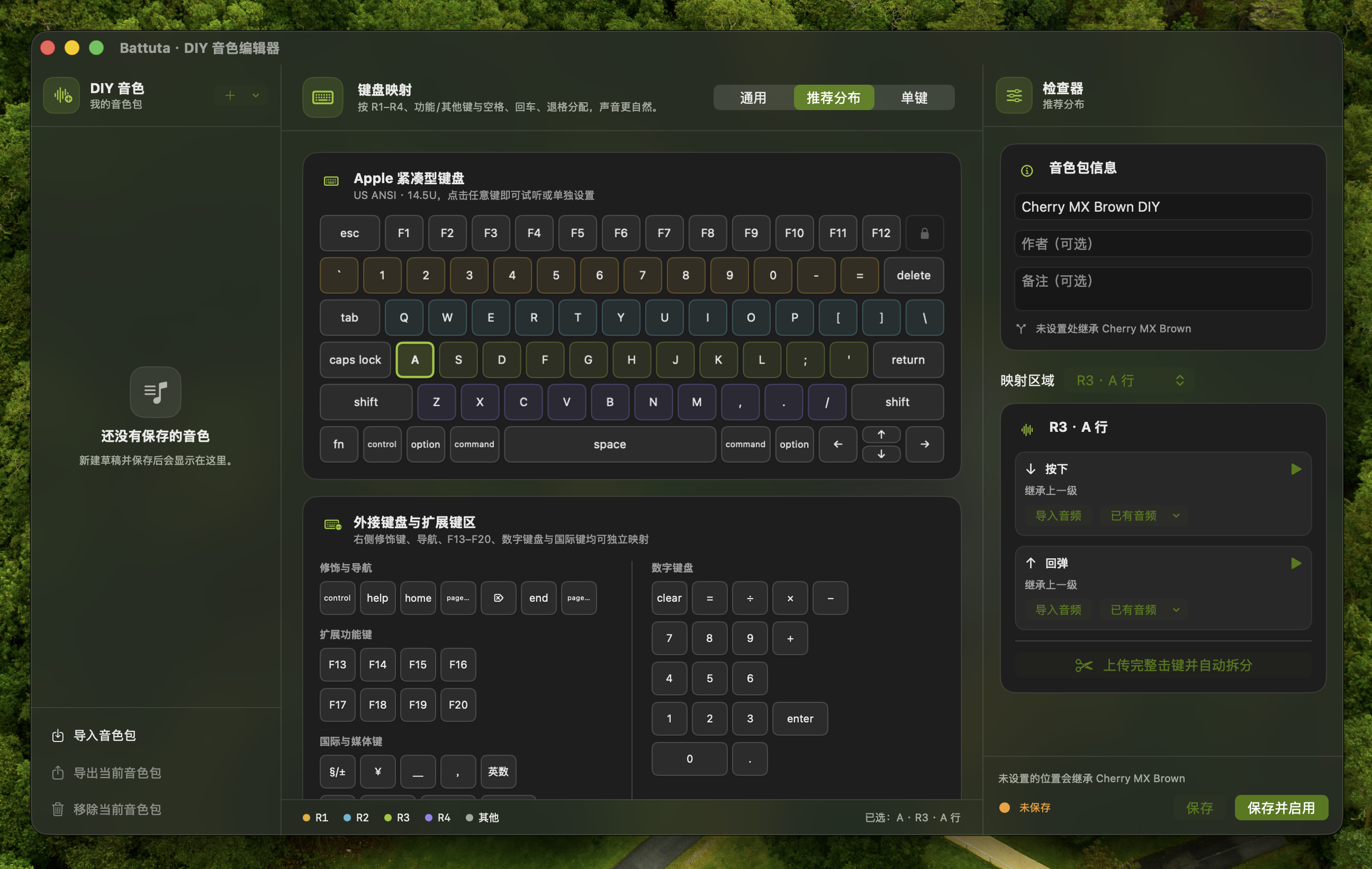
DIY sound editor
Import WAV, AIFF, CAF, M4A, and other common audio formats. Let Battuta suggest cut points, then preview and fine-tune the waveform. You can cover a whole keyboard, a row, large keys, or one specific key.
 View full image ↗
Mouse and trackpad
Classic microswitch, silent microswitch, sharp gaming click, heavy office click, and glass trackpad feedback stay independent of keyboard volume.
Everyday use
macOS users upgrading from 1.1.1 need one manual replacement install. Version 1.1.2 and later can keep using in-app updates. The Windows Store edition updates through the Store; the portable ZIP updates from GitHub releases.
Privacy is a boundary, not a switch
Battuta recognizes only the hardware events needed for sound playback and aggregate statistics: physical key codes, pointer buttons, press or release state, time, and the foreground app.
Characters, passwords, and pointer locations are never read, saved, or uploaded. Sounds, DIY sound packs, and typing statistics stay on your device.
Get started
macOS is available as a DMG. For Windows, Microsoft Store is recommended, with a portable ZIP for offline or no-install use.
Download the DMG for macOS and move it to Applications. On Windows, Microsoft Store is recommended, with a portable ZIP that runs after full extraction.
macOS requires a manual first-open approval and Input Monitoring. The Windows Store edition uses Store signing; the portable ZIP can prompt SmartScreen.
Battuta lives in the macOS menu bar or Windows system tray, and it can launch automatically when you sign in.
Install the DMG, pass Gatekeeper safely, enable Input Monitoring, and confirm that Battuta is receiving hardware events.
Windows installation guideChoose Microsoft Store or the portable ZIP, then keep Battuta in the notification area for system-wide sound.
Battuta 1.2.2 · macOS + Windows
macOS is available as a Universal DMG. On Windows, install from the Store or download a portable ZIP for the same release.
Frequently asked questions
No. Battuta uses only hardware key codes and press/release state to choose sounds. It never reads characters or saves or uploads passwords, typed text, or pointer locations.
Battuta needs global physical keyboard and pointer events to work across browsers, editors, and chat apps. macOS asks for Input Monitoring; Windows uses system input APIs. Neither implementation reads characters.
The app warms the audio engine on launch and preloads selected samples as 48 kHz PCM. A real keystroke only looks up and plays audio in memory, without disk reads or format conversion on the input path.
Yes. The DIY editor supports general press and release sounds, rows, large keys, and per-key overrides. It can also split one complete keystroke recording into separate press and release sounds.
 Battuta
Give every keystroke a sound you love.